
VISIA Skin Analysis Device
Evaluating a VISIA skin analysis device? Review capture quality, reports, consent, data storage, training and facility requirements.
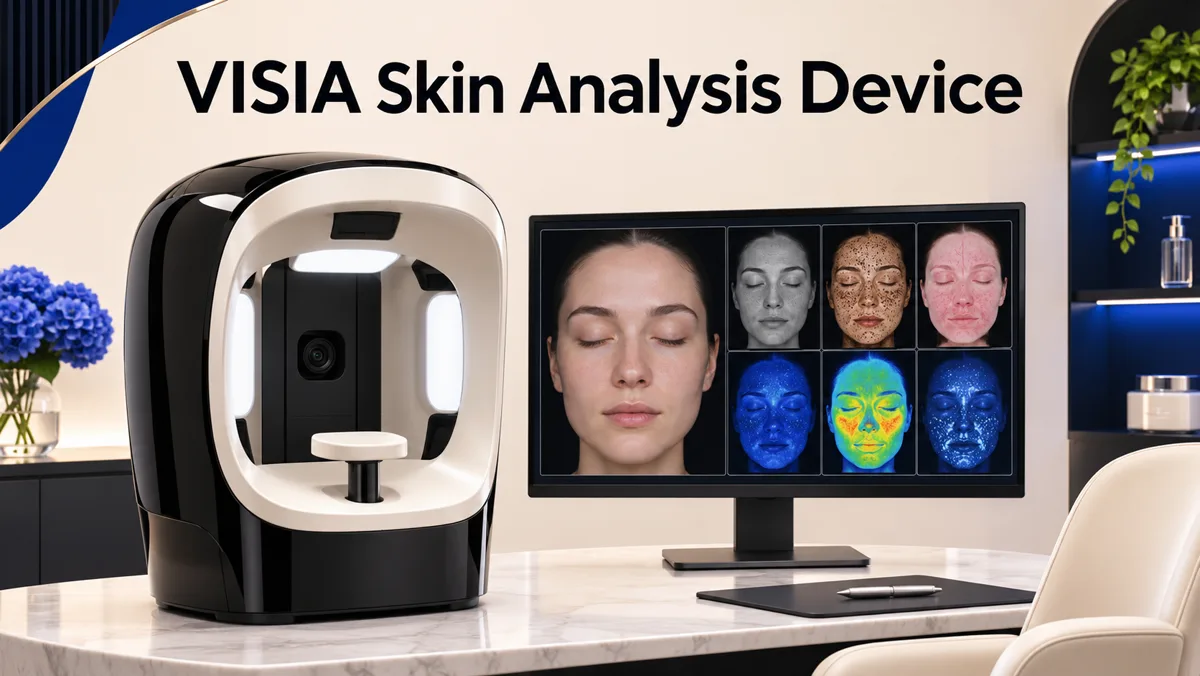
VISIA is a facial imaging and analysis platform used in aesthetic and skin consultations. A facility considering it should look beyond the appeal of colourful images. The real questions are whether captures are consistent, whether staff can explain the outputs responsibly, how consent and image storage work, and whether the system fits the consultation and follow-up process. An imaging device can support a conversation, but it does not independently diagnose every skin condition or prove that a treatment will work.
The cover image is an illustration of a generic facial imaging setup, not a photograph of a VISIA unit or its actual software. Regenis Life lists the Advance Skin Analysis Device (VISIA) in its equipment catalogue. This article examines that instrument specifically. It complements the broader medical device installation checklist, which applies across equipment categories.
What does VISIA capture?
Canfield Scientific describes VISIA as a standardized facial imaging system that can assess features such as spots, wrinkles, texture, pores, UV spots, brown areas, red areas and porphyrins. Its current VISIA product announcement also describes newer 3D capabilities. Product generation and software version matter, so a buyer should verify the exact model and feature set in the quotation. A brochure for another generation is not a reliable specification for the unit being supplied.
The value of standardized imaging is repeatability. If a person is photographed under different lighting, distance, head position or makeup conditions, a comparison may reflect the capture conditions rather than a real change. Ask for a demonstration of the patient positioning workflow, image quality controls and repeat-capture process. The operator should know when a scan is unsuitable or needs to be repeated.
Understand the output before using it in a consultation
VISIA can present measurements and visual overlays that help a practitioner discuss visible and less obvious features. Those outputs require interpretation. A coloured map is not a biopsy, a diagnosis of disease or a promise of future skin ageing. The facility should agree on which outputs it will explain to patients, what each metric means, and what the system cannot tell them. Staff should avoid turning a percentile or an age-like score into a frightening statement or a sales claim.
In a consultation, a clinician or trained professional can connect imaging findings with the person's history, symptoms, examination and goals. For example, a visible red-area pattern may prompt questions about irritation and skin care; it does not automatically establish a specific diagnosis. If a suspicious lesion or medical condition is possible, the appropriate pathway is clinical assessment or referral. Aesthetic imaging should not delay that care.
Compare software generations and analysis features
Before buying, ask which VISIA generation is available, which analyses are included, whether 3D capture is part of the package, and what software updates or subscriptions are required. Confirm whether reports can be compared across visits and whether images from an older device can be migrated. Ask how the system handles diverse skin tones and whether the comparison database and outputs are appropriate for the patient population you serve. A feature that looks impressive in a demo may be less useful if it is not validated for your real workflow.
Request sample reports with identifying information removed. Have both clinical and front-desk teams review them. Can the practitioner explain the terms without overselling? Can the patient understand what changed between visits? Is there a way to document uncertainty and treatment context? A strong consultation system supports informed decisions rather than substituting a score for professional judgment.
Build a consistent capture protocol
Create a short written protocol for room lighting, face preparation, hair positioning, makeup and sunscreen instructions, camera positioning and timing between repeat images. These details should follow the manufacturer's current instructions and the facility's clinical policy. Train staff to record factors that may affect comparison, such as a recent procedure, sun exposure, active irritation or a change in products. If the pre-visit instructions are inconsistent, the resulting trend may be hard to interpret.
Consider patient flow. Where will the device stand? Is there enough room for safe seating, operator movement and a private discussion of images? How long does capture take when a patient needs a repeat? Can the report be reviewed without blocking the next appointment? A device that improves consultation quality should not require staff to improvise privacy or rush through consent.
Consent, privacy and image ownership
Facial images are identifiable health-related data. Before capture, explain why images are being taken, how they will be stored, who can access them, whether they are used for follow-up and how long they are retained. Obtain the consent required by applicable law and facility policy. Marketing use, social-media posting and sharing with a third party need separate consideration. Do not assume that consent for clinical assessment also permits advertising.
Ask the supplier where data are stored, what happens if the facility changes software, how access is controlled and whether images can be exported or deleted. Review backup and recovery processes. Make sure staff accounts are individual where possible, and remove access when someone leaves. These questions belong in procurement, before patient images are collected. The Regenis equipment inventory guide explains how to record the wider asset and software information that supports safe ownership.
Training, maintenance and support
An installation should include more than switching on the camera. Ask for a documented handover covering room setup, capture protocol, analysis screens, report export, cleaning, software updates, troubleshooting and support contacts. Train staff in what the device does not diagnose. A competent operator should know when an image is poor, when a result needs clinician review and when the system should be taken out of service.
Confirm cleaning instructions for patient-contact surfaces and accessories, particularly between patients. Check electrical and IT requirements, network security, workstation compatibility and any scheduled performance checks. Ask who handles hardware repairs, what the warranty covers and whether software support is included. A clinic should know how consultations will continue if the system is unavailable for a week.
Measure whether the device helps the practice
Define the job before measuring success. A dermatology or aesthetic practice may want better baseline documentation, clearer patient explanations or more consistent follow-up. Choose a few measures such as capture quality, time per consultation, patient understanding and completeness of records. Avoid judging the system only by how many treatments are sold after a scan. The device should improve clinical communication and documentation first.
If you compare VISIA with another imaging platform, use the same patient scenarios and staff team. Compare image repeatability, clarity of reports, skin-tone performance, consent workflow, support and total operating effort. Ask what evidence supports each claimed metric. A side-by-side demonstration is more informative than a feature list copied from marketing materials.
Regenis Life can discuss the current VISIA configuration and facility requirements through its equipment catalogue. Product availability, specifications, regulatory status and support terms should be confirmed for the exact unit and market. This guide is procurement education, not medical advice or a guarantee of treatment outcomes.
Frequently asked questions
Is VISIA a diagnostic test for skin cancer or disease?
It is an imaging and analysis system for professional consultation. A concerning lesion or medical condition needs assessment by an appropriately qualified clinician; a VISIA report should not replace that examination.
Can VISIA images show whether a treatment worked?
Standardized before-and-after images may help document change. Interpretation still depends on consistent capture conditions, the treatment timeline, clinical examination and the limits of each metric.
Does every VISIA model include 3D analysis?
No assumption should be made from the product family name. Confirm the exact generation, software package and capabilities in the written quotation and current manufacturer documentation.
What should a facility ask about patient data?
Ask where images are stored, who can see them, how long they are retained, whether they can be exported or deleted, and what separate consent is needed for marketing use.
Is the device enough to recommend an aesthetic procedure?
No. Treatment choice requires history, examination, goals, alternatives, risks and professional judgment. Imaging can inform that discussion but should not dictate it.